
Creating and managing contracts
Void a contract
Stop an active signing cycle and close its outstanding signing links.
Last updated August 25, 2026
Void a contract when its active signing cycle must stop and recipients should no longer be able to use their outstanding signing links.
You can void a contract while it is Pending or has Changes requested.
Void the signing cycle
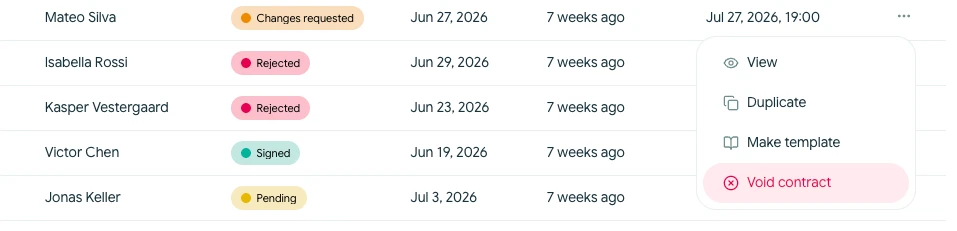
- Open Contracts and find the contract.
- Open its actions menu and choose Void contract. You can also use the available void action from the contract overview.
- Review the confirmation and select Void contract.
Voiding takes effect on the current signing cycle:
- Active signing links are closed
- Recipients cannot continue signing through those links
- The contract record and activity history remain available
- The timeline records that the contract was voided
Voiding is not the same as deleting a draft. It preserves what was sent and what happened afterward.
You cannot resume the same signing cycle after it has been voided. If you need to revise and send the agreement again, duplicate the closed contract to create a separate draft. You can archive the closed contract when you no longer need it in the active list.